
For many business owners, one of the most frustrating parts of hiring accounting support is not knowing what it will cost. You want help. You want better numbers. You want clear financial support. But too often, the pricing side of the conversation feels vague, delayed, or tied to hourly billing that can change from month to month.
That uncertainty makes it harder to plan ahead.
At Biz AccountPros, we have always believed there is a better way. Transparent monthly pricing has been a core part of how we serve clients, and our Pricing Calculator is a natural extension of that approach. It gives business owners a simple way to get a high-level estimate of their monthly accounting costs before the first meeting ever takes place.
Why Pricing Transparency Matters
Many business owners have had the same experience. You reach out to an accounting firm, schedule a call, explain your needs, and still walk away without a clear sense of what the service will cost. In some cases, pricing is based on hourly billing, which can lead to invoices that vary from month to month.
That model creates stress.
When pricing is unclear, it becomes harder to budget, compare options, and move forward with confidence. Business owners should not have to guess what their accounting support may cost. They should have enough information to make smart decisions from the start.
That is why Biz AccountPros has chosen a different path. Instead of relying on hourly billing, we focus on transparent monthly pricing designed to give clients more clarity and predictability.
What the Biz AccountPros Pricing Calculator Is
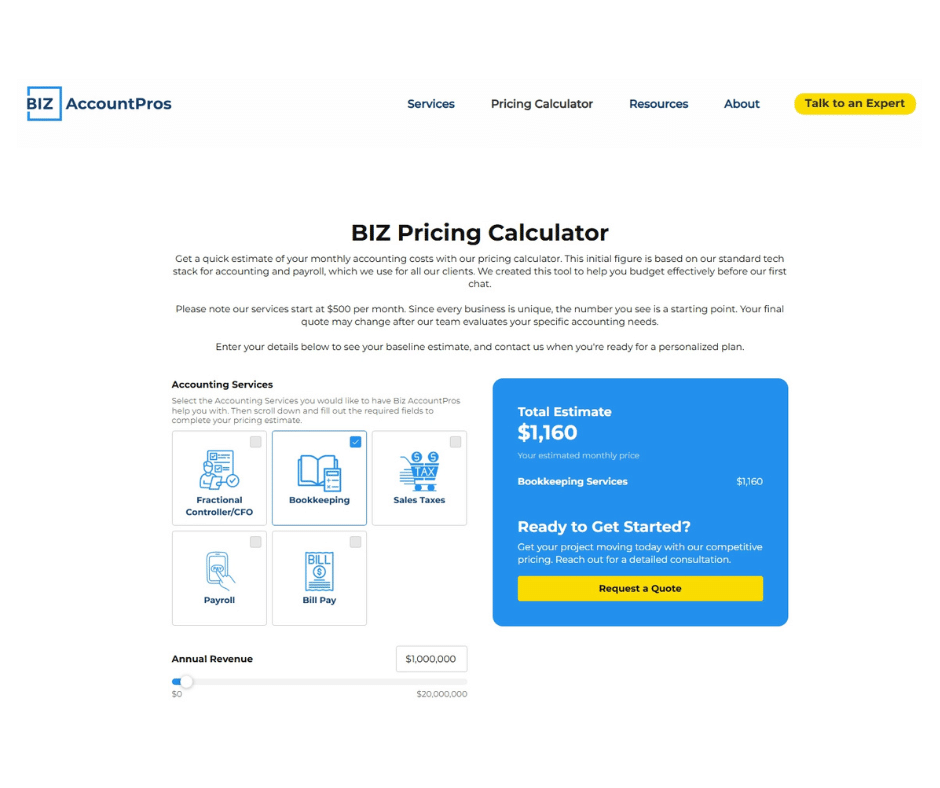
The Biz AccountPros Pricing Calculator is an online tool that helps business owners estimate what their monthly accounting fees may look like based on a few key details about their business and service needs.
It is not meant to replace a real conversation. It is meant to make that conversation easier.
Rather than starting with uncertainty, you can begin with a practical estimate. That helps you understand the general investment involved and gives you a clearer picture of what outsourced accounting support may look like for your business.
How the Pricing Calculator Works
Our calculator is designed to be simple and straightforward. In just a few steps, you can get a clear estimate of your monthly accounting fees:
- Share basic information about your business.
- Select the accounting services you are looking for.
- Receive an estimated monthly price range based on your needs.
This process removes the guesswork, giving you a clear, helpful starting point before we even have a conversation.
Why This Reflects the Biz AccountPros Approach
The Pricing Calculator is not just a tool on a website. It reflects a larger belief about how accounting services should be delivered.
From the beginning, Biz AccountPros has been committed to transparent monthly pricing instead of hourly billing. That approach gives clients a better experience in several ways.
With monthly pricing, you know what to expect. You are not left wondering how many hours were tracked or whether a quick question will turn into a bigger invoice. You can plan more effectively because your accounting support is easier to budget for each month.
That level of clarity matters, especially for growing businesses that need strong financial support without more uncertainty.
The calculator brings that philosophy to life before a client even signs on. It gives business owners a way to explore costs early, on their own time, and with more confidence.
The Benefits for Business Owners
For business owners, the value of the Pricing Calculator is simple: it saves time and reduces uncertainty.
Here are a few of the biggest benefits.
Clarity Before You Commit
You do not have to wait until the end of a discovery call to get a sense of cost. The calculator helps you understand pricing early in the process.
Better Budget Planning
If you are evaluating outside accounting support, knowing the estimated monthly cost helps you make more informed financial decisions.
A Simpler Starting Point
Some business owners hesitate to reach out because they do not know what the conversation will lead to. The calculator gives you a low-pressure way to start exploring your options.
More Predictability
Transparent monthly pricing supports better planning than hourly billing. Instead of dealing with moving targets, you get a more stable view of what support may cost.
A More Modern Client Experience
Business owners expect better access to information. A pricing calculator makes the process more convenient, more efficient, and more aligned with how people want to evaluate services today.
A Practical Tool for a Common Problem
Every business owner has enough on their plate already. If you are trying to improve your books, gain better reporting, or hand off accounting tasks to a trusted team, the last thing you need is more confusion around pricing.
That is the problem the Biz AccountPros Pricing Calculator helps solve.
It takes a part of the process that often feels unclear and makes it more useful. Instead of wondering what accounting support might cost, you can get a practical estimate and move forward with better information.
That does not just make things easier. It helps build trust from the start.
Try the Pricing Calculator Today
If you have been wondering what monthly accounting support may cost for your business, the Biz AccountPros Pricing Calculator is a great place to begin.
Visit the Biz AccountPros website, enter a few details, and get a simple estimate based on your needs. It is a fast, straightforward way to explore your options and see what transparent pricing can look like in practice.
Like what you read today? Leave a 5 Star Review on the Biz AccountPros page on Incredible Towns